 Admittedly this is sort of a weird Works For Me Wednesday, because it all starts with the pattern on these pants:
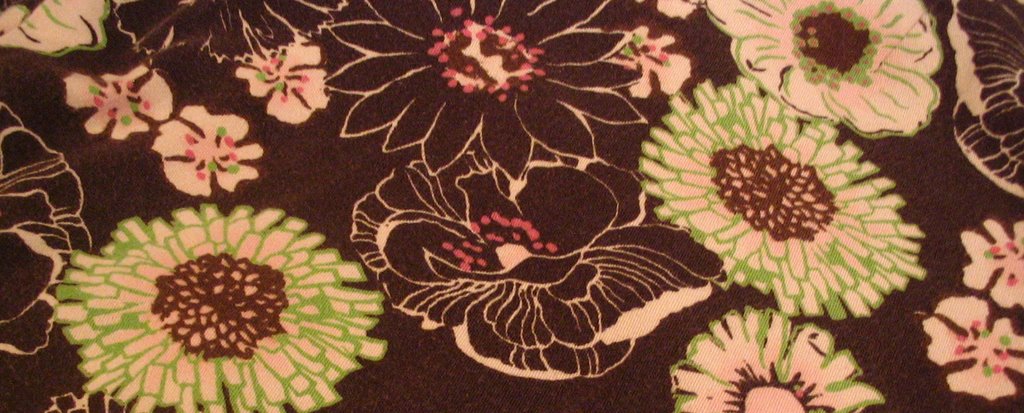 See, I was cleaning out my closet yesterday, and when I saw these pants, I thought, “You know, that’s sort of the look I’ve wanted to have on my blog.”
Oh but you think I’m kidding.
Seriously, I’ve wanted to change the look for awhile, but I didn’t have any inspiration. But when I saw the browns and the pinks and the greens, I knew I had found a starting point. And since Addie helped me so much the first time I tried to to swap out my banner, change my background, etc., I had a pretty good idea of what I needed to do…and it’s really not as hard as you might think.
So, in the spirit of WFMW, here’s how I changed my template just enough to make a big difference. Keep in mind that I’m talking specifically about Blogger, so if you use TypePad or WordPress or whatever, this explanation may not work for you.
First, I set up a new blog – a test blog – really simple if you’re using something free like Blogger. This is a great place to save the info in your current template and start to work with it. The best thing is that I can tinker with the test blog to my heart’s content and not one letter gets changed on my “real” blog. When I get the test blog like I want it, I copy and paste any code that has changed back over here.
Second, I made sure that I knew what I was after design-wise. Find your inspiration, whether it’s in a photograph, a piece of clip art, or even a pair of pants.
After I figured out what kind of look I wanted, I looked at some of the free or REALLY low-cost stock photography sites. I found my new pants-inspired background illustration on iStockPhoto, and I paid a WHOLE DOLLAR for it. Once I downloaded the file, I was able to start working with it (you can use Photoshop, Illustrator, etc.). You do have to have a little knowledge about how to do text boxes and that kind of thing – but you can easily find that out online. Or, if you’re me, yell “HUSBAND!” and let your computer-savvy hubby help.
 Next, I looked at my template code to see how many pixels my banner (the place with your blog name and tagline) needed to be. See where it says 692? That means my banner needs to be at least that many pixels wide. The height is pretty flexible. You can do all the editing – inserting type, playing around with fonts, tweaking the colors – after you have the correct size set up. And as for the background image – the stuff along the sides – I just make that about 300 pixels wider than my banner. It’s a separate file from the banner, and I just sort of figured out how to make it work through trial and error.
The last step in the “design” process is to save everything as JPEG files, and I use PhotoBucket to host my images. Once you’ve uploaded to your photo host, the bulk of your work is done.
So on to to the template. The fun part. :-) And if you try this, remember: don’t even THINK about messing with your template until you have made a back-up copy of your code. That’s where all your links, sidebar stuff, and any modifications are, and you don’t want to lose ANY of that. So select it all, copy, and paste it in a .txt file – then SAVE IT.
Once all the code was saved and sound, I just copied and pasted the URL of where my banner image is stored into my template (you’ll see that info underneath your pics in Photobucket). That place in your template will look something like this, and all you have to change is the part between the quotation marks on the “img src” line.

Finally, I put the URL for my new background image in the place that looks like this, and again, all I had to change was what’s in between the quotation marks on the “background” line. (And you don’t have to change the background at all if you don’t want to – I just happened to like a washed out version of my banner running down the sides.)
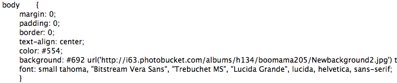
Here’s the most important thing I’ve learned as a VERY amateur-ish template tinkerer: stick with the horse that brung ya. I’m still using my very first Blogger template – Son of Moto, I think it’s called – all I’ve changed are two pieces of code (the banner and the background). But doing those things will give you a whole new look. Plus, I don’t have to transfer all my link and sidebar info into another template. That works for me!
Now if all this talk of downloading and editing and template changing just exhausts you, try out one of the many free Blogger templates available. I found some adorable free ones at Zoot’s Designs, and I came very close to using one of those…all the code is right there on her site (remember, if you set it up on a test blog first, you can copy and paste in your links from your real blog, then, when you’re finished, copy and paste all your edited code back over to the place we normally visit).
Also, there are so many talented designers / bloggers who can create custom designs for a reasonable fee, like Jules, Susie, Karin and Becky, just to name a few.
And again, PLEASE remember: ALWAYS make a copy of the code you’re currently using – NEVER start to manipulate the HTML in your current template without having a back-up.
I know this is an unusually long WFMW, but I figured I’d better write down this info while it’s fresh on my mind – and hopefully it will help some of you, too. That ALWAYS works for me. :-)
Happy Blogging, everybody!
For more great WFMW ideas, visit Rocks In My Dryer.


I got lost in there somewhere but I so want to be like all my blogging friends who are cool (Jan Brady voice.) Maybe some day when my children are at Mimi’s, I’ll give it a try….
Oh, this is too good. I have wanted and wanted to do something creative with my blog, but didn’t have a CLUE where to start. Thanks a million, no thanks a billion! Now I just have to wait till I finish with the family reunion we are hosting this weekend and the trip to Mexico for mission work we are going on next week and moving my son to college in August and…well, I’ll get to it I promise!
Gorgeous! Good job girl!!! Love the background. And I love that you’ve posted your pic! :)
I love your new look! Amazing that you did it all on your own! You guys who do this are so smart!
Thanks for the info and encouragement to try something different. Definitely going to tinker away with my blog!
Below is a website from which you can get many free photos:
http://www.sxc.hu/
Great new look, BM.
Daph, if you don’t start a blog I’m going to SCREAM. SCREEEEEEEAM. :-) And we’re expecting you the weekend of the 30th. Officially.
BooMama,
You’re WAY too sophisticated for me! That, or you have too much free time ;-)
I can’t even get my blog to link here!
I just had to empty out the contents of my almost full freezer, they moved the freezer out on my back patio, then carried everything back out and loaded everything back in the freezer (IN NO PARTICULAR ORDER!)and now I’m waiting on them to get the waterheater changed out. I looked in there where they moved the freezer and waterheater, and I’m just totally mortified what collected under them in 26 years! I have to clean that up when they get done. :(
So, how is YOUR morning going? :)
I don’t know if I will ever be brave enough to try it, but I do want something new for my blog. This is great, BooMama, and just what I need. Step-by-step instructions, woo hoo!
I’ll be checking out those sites, too. Thanks for the tech support, BooMama. :)
Have been playing around with my template and just can’t get it like I want it. Thanks for the inspiration and the info! I love the flowers and new font in your title.
Yes, you were right on with this comment—back up your original html code on your blogger template! Ask me how I know grrrrr! :)
back up , back up, back up. can’t say it enough.
ps – I do love the colors, they are subtle but funky
I cant even tell you how impressed I am – that you DID this!!! That you started with a pair of pants, and whalah! New template. Amazes me. I decided I wanted one too and promptly bought it. (Upcoming in near future). So I am printing this out, including all comments. And sometime when I’m bored, not that that ever happens I’ll play around with it. One thing Barb and I have been saying to each other is “test blog” – try it there first. So great that you told everyone. You amaze me. Seriously.
I wish for a test blog, hee hee. Probably the only bad thing about not being with blogger. I love making custom templates tho, too fun!
Let me guess…you majored in blogology in college, right? I’m with Bev. I’m in AWE. So for starters I’m printing this out, too. Me and my little test blog will play around with this when I have six calm minutes alone! Not that I think I can do this in six minutes, though. Ha ha ha. So I’m printing this and Shannon’s post about haloscan (scary but I love haloscan) and every single other post I can find about creating a new and improved version. Some great links in your post and the comments, too. Thanks!
I promise – it really doesn’t take as long as you think…I found the background when Alex was taking a nap…and then after supper D. and I took turns working on it / manning the child – probably took about an hour or hour and a half to crop everything, put the new type on, get it uploaded, and add to the template. D. is super fast in Photoshop, I’ll admit. That helps. :-)
The good thing is that if you set up a test blog, you can work on it awhile, save it, then come back to it the next day or next week or whenever.
But BACK UP EVERYTHING BEFORE YOU START. PLEEEEEEASE.
I like the new look. :)
To start with, I love the new look. It is very light and fun and wacky, just like you seem to be.
I love that this post is about changing things up. You have some great tips, especially about the new mock up blog.
Lastly, I did the haloscan, but lost all my comments from the start. Do you have any techno tips on how to undo that?
Oh, and I love your profile pic!
You, my dear, did a fantabulous job! I just posted about designing, imagine that ;)
Beautimous, just beautimous!
Heather
Thanks SO MUCH for this lesson! Can’t wait to start tweaking my own blog’s “look!”
Oh, I just saved this to my “to do” file. I have been wanting to make my own custom banner, and make some changes, but this is much easier than the random info I’ve tried to gather. Thank you!! I particularly like your advice to stick with the horse that brung ya, because I was thinking of changing to a more basic template and going from there, but I will leave well enough alone.
Aren’t you clever?! The new background and banner are so cute! Inspiration from pants, now that’s my kinda gal. (I do that kind of thing when I make beads, but I never applied it to web design before.)
A test blog – so smart. I ruined mine a few times and then handed it over to an expert. But I might get brave again someday and start tinkering with it. I’m emailing this to myself for future reference. Thanks!
PS-Love the pants.
First, I’ll go ahead and admit that I didn’t read the whole post. I really tried, but once my eyes crossed and the room started to spin, I just wimped out. Sorry.
Love, love, triple LOVE that you got it to look so cool, and that you had the perspicuity to relate it here for tens of people to see.
Thanks for your comments on my blog. I’m spending WAAAAaaaaAAAAY too much time fortifying our kinship by reading your back posts. When I say it that way it sounds a teensy bit spiritual, don’t you think?
Okay, I’m not really sure if we can be friends now–you are officially WAY smarter than me. (I? I can’t ever remember.) I think my brain overheated somewhere half-way through your explanation, which was actually very easy to understand, if I weren’t ridiculously slow when it comes to technology! I didn’t even know you could change your own template colors! (That’s why Susie is designing mine for me, to be revealed any minute! Or day)
It looks fabulous. Pat yourself on the back and treat yourself to some chocolate and a huge diet Coke. You earned it! :)
Love the new look, although I’m not sure what the old look was since this is my first time visiting your blog. I’m impressed that you did this yourself and then shared instructions with the rest of us!
I’ve just posted my first WFMW. Stop by and take a peek. :)
Okay, since I’m not ready for this, I got a little lost, but I’m going to bookmark this post so I can try this when I can devote some time to it. You wrote a great step-by-step guide and I think it will help when I can really focus on it. Thank you!
How did you know I’ve been wanting to play around with my template? Do you have ESPN?
Thanks for the step-by-step. I can’t wait to start tinkering.
Not on blogger, so this won’t WFMW or any other day. I just want to say that you are absolutely precious for sharing these simple instructions with your Blogger sisters. Many folks hoard their computer knowledge when, really, we’re all in this together.
Hooray for you!!!!
I recently changed mine and LOVE it. But, alas, I am techno overwhelmed at present and had TNChick do mine. I have a link to her on my side bar. She was wonderful, and I forced her to take money!! I felt better after all she did for me.
I love that you wanted to share what you learned and the instructions look good. I think I could do this if I was so inclined. Thanks, Pam
Oh gosh – it is too late at night – i got a headache halfway through that. My problem is that I have a techie twin so I just get her to do everything and never learn myself. So pathetic, but true.
I know so little. Once she said, how is it that you can look like me but know nothing?
Thanks for the info and inspiration. I can’t wait to play!
This is great. I just updated my blog look yesterday but it needs some definite tweaking. I had an idea what I needed to do but this spells it out so clearly. Little by little I’m getting the hang of this, thanks to helpful info like this.
Ok, I’m going to print this and try it. If I totally mess everything up–I’ll see you on Sunday. =)
THANKS for the shout-out!
I was inspired to mess with my template after reading your post. Question – do you know if there is any way to get haloscan without losing all of your previous comments? I tried it once, but when the comments disappeared I panicked and uninstalled it.
I’ve been meaning to stop by here and thank you for the plug! :) I appreciate that!