When I was growing up, parents didn’t really give much thought to how they were going to prepare their kids for technology. It was the 70s and 80s, after all, and the only real technology on our horizon was a home computer that ran MS-DOS or the sah-weet Texas Instruments calculator that marked the beginning of pre-calculus. Well, and there was also the Brother Word Processor that I took to college my junior year, but considering that all I could do with it was 1) type papers and 2) print papers, it didn’t really add to my understanding about the responsibilities that go along with technology. Unless the responsibilities involved buying pricey typewriter ribbons, of course.
But the times, they have changed. And as the mama of an eight year-old, I sometimes feel a little bit panicked when I think of everything that’s “out there.” Between the web, texting, Facebook, emailing and IM’ing, there’s just a lot to consider, you know? So far our little guy’s computer use is restricted to about five sites that we have bookmarked for him, and the computer that he uses is in a wide-open area right off of our kitchen, AS IT FOREVER WILL BE. But I know the day is coming when we’ll need to help him broaden his technological horizons – for schoolwork if nothing else – and I want to be sure that we teach him well.
So, given all of that, it was a no-brainer for me when BlogHer asked if I’d like to review MouseMail, a web-based email client that’s geared toward first-time email users and designed to help parents supervise and protect their kids. I thought the concept sounded great, and while an email account is probably a year or two down the road for our little guy, I’m all for testing out options that will enable us to navigate unchartered email territory a little easier when the time comes. Not to mention the fact that I was delighted to hear that a company was forward-thinking enough to recognize that there are a lot of parents who want to be a part of the process when it comes to introducing technology to their kids.
A couple of weeks ago I went to MouseMail.com and set up an account for me and an account for Alex. I wanted to know how much control I’d have over his account, and I also wanted to know what the email interface would be like for him. What I’ve discovered as I’ve taken the service for a little “test drive,” so to speak, is that there are several aspects that I definitely like – but a few that I would change if I could.
What do I like?
Well, here’s a list.
1) The parent can see any message that comes into or goes out of the child’s email account. On top of that, a message doesn’t even make it to the child’s inbox until the parent has approved the message or the sender. I think that’s great. Parents can also approve contacts (like, say, a sibling or a grandparent) so that those emails go directly to the child’s inbox, but if those emails contain any language that’s listed as inappropriate in the MouseMail dictionary, the message is flagged and sits in moderation until the parent has a chance to look at it.
2) MouseMail comes complete with a dictionary that flags inappropriate words and abbreviations. Parents can add to that dictionary as frequently as they like.
3) A parent can monitor accounts for all of their children from one central dashboard. If you have four kids with email accounts, you can adjust their individual settings to whatever might be age-appropriate for them, and you don’t have to log in and log out of five different accounts to do that. Having all the kids’ email addresses in one place is much more efficient and convenient. You just click on a child’s name, see if there’s anything to review, then move on to the next child.

4) The interface is very kid-friendly. It’s straightforward, and it’s icon-driven. As tech-savvy as kids are today, there’s no question that they’d be comfortably emailing within five minutes of logging on for the first time. It’s always nice to be able to introduce something new without frustration for you or your kids.
5) Parents control what features kids can use. MouseMail also offers web texting and games (more on those things later), but parents can modify those features so that kids can’t use them. Parents can also control the times of day (and days of the week) when kids can use the web texting feature, and I think that will come in handy for parents who want for their children to use that feature.
What would I change?
1) MouseMail comes with games. I’m not sure why this is necessary, but I initially figured it was harmless and no big deal. However, after I clicked around a little bit, I realized that each game contains a link to a gaming site. I thought maybe the link only worked for parents, but when I logged in to Alex’s account, I realized that links work for kids, too. It seems a little strange to me that an email service designed to protect kids would have links to sites that I’d never allow my child to visit at this stage in his life. Parents can block the games so that kids can’t see them, but there are over 30 games, and it was kind of a pain to go through and individually block every single one.
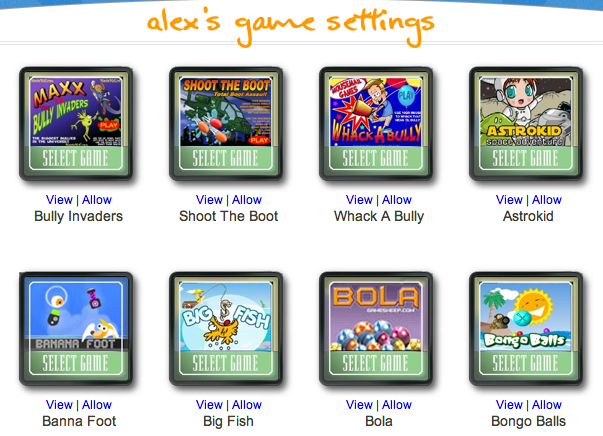
I’d love to see a “block all” option. Plus, the games icon still shows up at the bottom of the big list of red icons on the child’s mail dashboard – even if all of the games are blocked. If there’s a way to block the games icon and prevent it from showing up on the child’s account, I haven’t figured it out yet.
2) MouseMail also comes with web texting. Kids just click on a phone icon, and at that point they can either select a contact (which has been approved by the parent) or enter in a phone number. I think that being able to enter in a phone number is a bad idea. Just to see how it worked, I signed in to Alex’s account and entered a friend’s phone number. I was able to send that friend a text without the text going to moderation for parent review. My friend’s reply did go to moderation, which is good, but I just don’t love the thought of young kids being able to text random numbers. There was a work-around, though; I went into the parent settings and created a rule that pretty much turned off the texting feature.
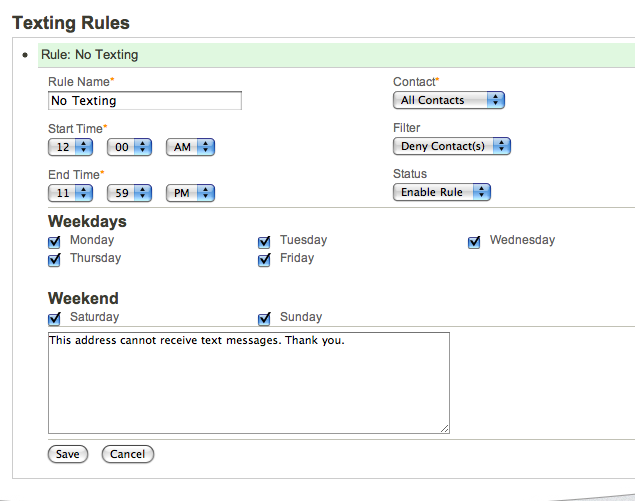
The icon still shows up on the child’s dashboard, though – and if there’s a way to get rid of it, I haven’t found it.

3) There’s a tasks feature where a parent can enter a chore or assignment, and then kids earn MouseMail points when the task is completed. Kids also earn points that go in their MouseMail “bank” when they answer a question correctly when they log in. Keeping up with points and rewards and all that sort of stuff just isn’t my thing, so that’s definitely a feature that I’d turn off if I could. And I’d remove the icon on my child’s dashboard, too. :-)
All in all, I think MouseMail is a great concept. I so appreciate that they’re trying to cooperate with parents as we help our kids learn to be responsible and safe as far as technology is concerned. I also recognize that it’s a free service that will no doubt provide a lot of value for thousands of parents. I would love, though, to have the option to pay a minimal fee in order to have greater customization. I think it would be great if parents could remove the icons of features that they don’t want their kids to use.
MouseMail is definitely on the right track, and I’ll be curious to see how they modify and improve this much-needed email option. I’ll continue to check my account so that I can keep up with changes, and I’ll definitely consider MouseMail when it’s time for our little boy to have his first email account. I hope that it’ll be more customizable when that day comes.
So what about you? Do you have any practical tips for helping kids learn how to be responsible with technology? Do you think there’s an ideal age to introduce email? Or cell phones? Leave your feedback in the comments, and you’ll be entered to win a $100 Visa gift card courtesy of BlogHer.
Also, visit the BlogHer Promotions and Prizes section for more chances to win!
This sweepstakes will run from 7/18-8/15.
Can’t wait to hear from y’all – and good luck!
No duplicate comments.
You may receive (2) total entries by selecting from the following entry
methods:
a) Leave a comment in response to the sweepstakes prompt on this post
b) Tweet about this promotion and leave the URL to that tweet in a comment
on this post
c) Blog about this promotion and leave the URL to that post in a comment on
this post
d) For those with no Twitter or blog, read the official rules to learn about
an alternate form of entry.
This giveaway is open to US Residents age 18 or older
Winners will be selected via random draw, and will be notified by e-mail.
You have 72 hours to get back to me, otherwise a new winner will be
selected.
The Official Rules are available here.
This giveaway is now closed.


i don’t know i’m scared about kids and tech…my only real tip is to teach them how to use a cellphone in an emergency….
nannypanpan at gmail.com
I think this all depends on the parent/child. My daughter is 10 and she has several electronics, she is however the only child, and very responsible.
I tweeted http://twitter.com/#!/Jammie79/status/102268190117216256
I think the best tool is waiting to introduce it until they are old enough to handle it.
ky2here at msn dot com
http://twitter.com/#!/ky2here1/status/102391224664727552
ky2here at msn dot com
I actually do not have kids of my own, but if I did, this would be something I would definitely check out and probably use. My own personal opinion is that the family PC should be in the main living area or kitchen of the house and only used when parents are home. I know that is easier said than done but I think it would really cut back on misuse and problems from meeting strangers online. I also feel that cell phones are for adult use only. I guess I am just really old fashioned. I think that kids need to be kids and adults adults. Kids don’t need to have all the adult gadgets, even if they think they do.
I tweeted here: http://twitter.com/#!/FotoMacro/status/102478998625460224
I don’t know that there is an ideal age for any of it. Partially I think it depends on the kid and what it’s going to be used for. I think we have to monitor our kids to keep them safe no matter what we choose though. They just don’t have the same filters in their brain that we do or the same impulse control. They can earn the right to privacy and freedom online eventually I think, but I want my kid to be as old as possible before that happens.
I do think that in high schools right now there is a strong feeling of NEED by the kids and that they have a RIGHT to their phone. That they need the phone so their parents can get ahold of them, they have the right to keep in touch with their friends through social media during the day, etc. Personally I think that’s crap. Parents got ahold of kids for many years while they were at school when there was a NEED through the main office. I think phones should be off (NOT on vibrate) and banned to their lockers during the school day. Unfortunately there is no feasible way to do this. As a parent? I will be blocking my child’s use of the phone during the school day. If they need to get ahold of me they can go old-school and walk to the office and request to call.
I believe kids can wait for technology. I will have mine wait til at least 13. I will then monitor each time they check email or use computers. Kids these days have too much freedom & are learning bad habits at an early age.
I have tweeted this giveaway as well http://twitter.com/#!/jenharriman123/status/102519596141117440
I think it depends on the kids and how responsible/mature they are as to what age you start giving them freedom. Not something that one size fits all.
It’s a constant struggle to decide how much technology to give them. If one kid is responsible, they may be ready much younger than an older child who is a little clueless as to what’s going on around her. And we can only control so much. What happens when they’re using a public computer or their friends’ computers?
I think 12 is a good age for a cell phone. I like the pay as you go plans, because the phone is basically used for emergencies only.
twoofakind12@yahoo.com
The main way we teach kids to be responsible with technology is for us to be responsible. We talk about phishing emails and scams and help the kids understand what they look like. We never use the cell phone while driving. Stuff like that.
3oink63moo484@gmail.com
My son did not use email or a cell phone until he was a Freshman in high school. Until that time, he pretty much had adult supervision and if he absolutely needed to contact me, he knew to ask to use the adult’s phone.
I tweeted.
http://twitter.com/#!/rilekat/status/102746406405685248
Sounds like a good introduction to the email.
http://twitter.com/#!/Myne_Whitman/status/102764510665908224
I believe that the longer I can hold out on the cell phone issue the better. My son is only 7 right now but there are others his age who already have a phone! to me this is crazy- what does a 7 year old need a cell phone for? Thankfully he has expressed no interest in owning one!
My boys don’t have cell phones, just trac phones, till they get more responsible
My kids are on the computer, or really just one of them, my two year old can play on my phone but not on the computer since she ripped the keys off my husbands computer.
I let my five year old play the penguin game and also xtramath online. I am going to check out this mousemail as well though I don’t really see any reason to get her email unless someone is going to be emailing her.
I think ideally, I’d know another mom who is similar to be technology know-how-wise and parenting-wise who has a kid of similar age and we coordinated so they could email each other. I’m not sure how/if that would happen, maybe if the app which the parent obviously signs the kid up for also connected the parents? So they could connect too? I am not sure if/how that would work. I’ll think about it and when I get a chance to check it out I’ll blog about it for sure!!
..oh and regarding when they get phones? I’ll have one they can ”take” with them as soon as possible. I have wished I could text my oldest many times so can’t wait til I have an appropriate on for her!!
I’d like to wait until my kids are at least 10 until they start using email, and only with my supervision. Cell phones can wait until they are teens.
My brother bought my niece a cell phone when she was six, and guess what happened – she lost it! He bought her another one, which she also lost. He finally decided to wait until she was older, but that is really way too young. I think 13 is a good age as long as the s/he is somewhat responsible.
I don’t think kids really need email or cell phones until 12 or 13 when they’re more likely to have afterschool activities that their parents don’t bring them to.
wolverina401 at gmail dot com
I think 12-14 is the best age to get a cell phone when after school sports etc become a big part of the school year & I want an easy way for my child to reach me and vice versa
I think it’s okay to have an email for your child at any age, but only the parent should know the password and they can sit with their child to read and write emails. It’s a great way to introduce technology but keep an eye on what they see.
I don’t think there is a set age, it’s different for every child.
My son didn’t get an email account until he was 15, but I still have access to it and check it regularly. I believe it is totally ridiculous to get little kids cell phones. My son was offered one last year but said he didn’t like it, so he got none! Guess he wanted an iPhone or something better than just a simple one, but guess what – he can have whichever one he pleases when he works and spends his own money on it. He will probably keep better track of it then, anyhow.
My son has had a cell phone since 3rd grade because I’m a single mom, I need to know where he is and to ensure that he gets home safely. I had alot of restrictions on this phone, but he has been really good with it. He’s not allowed to call friends, only family. He’s aware of the issues on the internet, however, he seems to stick with games which I review first.
Tweet: http://twitter.com/#!/computerfan/status/102958911556042752
I think the preteen years or middle school is more appropriate, because they are doing more after school activities and going through hormonal body changes and need to be able to contact mom and dad in case of an emergency only
tbarrettno1 at gmail dot com
tweet
http://twitter.com/#!/ChelleB36/status/102961467170619392
tbarrettno1 at gmail dot com
We have a ‘house’ cell that we allow the kids (ages 11 and 12) to use when they are walking the short distance to friends houses (we live in a rural closed community on a dead end road about 1 mile or so around) and if we run into town for milk or short periods of time. But in our personal preference they are too young to have their own cell phone…. when they are driving we will get them thier own providing they can be responsible enough with it.
I tweeted about this giveaway as @nikalann28
http://twitter.com/#!/nikalann28/status/102970204518219777
My oldest got a cell phone at 13 because she was is several sports at school and I liked having a way to keep in contact with her during away games that I could not make it too. My younger children will not be getting a phone until they are around the same age.
lisalmg25 at gmail dot com
Tweeted: http://twitter.com/#!/lisalmg/status/102978584393687040
lisalmg25 at gmail dot com
Well if it was up to me I would have them be in high school before I allowed any of the technology for them but my husband disagrees and we will probably introduce them to it in the next few years (preteen).
I don’t think kids need cell phones until high school.
We are definitely going to sit down with our daughter when the time comes and explain internet/technology safety to her. I am not sure at what age she will have a cell phone. We don’t really see a need until she is going to be away from us and would have the need to contact us in case of an emergency. She will need to be prob around 13 for an email account, that we will monitor…but she will not be allowed on any social networking sites.
Tweet: http://twitter.com/#!/hillfam2005/status/103057384959787008
Why do kids younger than middle or high school need cell phones?
we’re pretty strict about technology around here-the kids don’t like it, but I’m the parent!
dwellenstein at cox dot net
Start them with an inexpensive phone, etc to make sure they can be responsible with it.
i think it depends on the child and their maturity, i will not get cell phones for our children until at least middle school and then i will monitor them like a hawk, calls only, no pictures or texting or web.
I was shocked to see that both my grandsons have Facebook accounts and one is only 8 years old. I don’t know how well they are monitored but I think that is far too young unless Mom or Dad are right by their side. I agree that a cell phone isn’t necessary until a child is going to be involved in activities without parents close by.
Tweeted – http://twitter.com/#!/willitara/status/103133004322451457
I don’t think my son is ready for a cell phone yet. He has asked, already, though! I’m pleased that his grades have improved, but I think we’ll wait until 8th grade.
tweeted:
(http://twitter.com/#!/LuckyDuckyToo/status/103144226166018048)
Thanks for the giveaway!
I think children are given cell phones far too early and do not need one until they come to an age where they are going out on their own a lot or with friends
We have been using netnanny software on the computer for some time now. We caved in to our daughter and got her a cell phone at the age of 11. It is a pay as you go phone
brich22 at earthlink dot net
tweet
http://twitter.com/#!/brich2222/status/103155553290829824
brich22 at earthlink dot net
When my kids are younger, they are always with us or a parent we know that has a cell phone but now I have a jr high daughter and she is often going to sports or music practice after school and is on her own at times at home so it is great for her to have a cell phone at age 13 to communicate with us if practice is changed or she needs to be picked up or can’t get a ride or whatever.
kerrie@mayansfamily.com
I tweeted
http://twitter.com/#!/kmayans/status/103155588405526528
I really think the age is contingent on the maturity level, with that said programs like this are essential in this day and age for any age.
Tweet: https://twitter.com/#!/flowergirl523/status/103187662554411008
Blogged: http://insanityisforthelame.blogspot.com/2011/08/mousemail-review-100-visa-gift-card.html
I don’t know what the right age is I did not have email and cell phones when I was younger! Thanks great giveaway :)
tishajean@ charter.net
Tweeted too
http://twitter.com/#!/latishajean/status/103202155489525761
tishajean@ charter.net
I think you need to sit down and talk with your kids about technology with the pros and cons and give them specific rules. As far as cell phones go, if they need to contact you because of after school activities then I think that’s the appropriate time for them to have them.
Cell Phones where they have their own personal phone I’m not a fan of until high school and within certain boundaries: none at the dinner table, etc…
My tip would be they need to be supervised at all times. I wouldn’t even consider it before they’re in middle school (so, 12, 13ish) and even then it depends on the maturity level of the child.
I have no kids and have no tips or anything. This sounds like a good program.
Thanks for the contest.
blogged: http://slehan.blogspot.com/2011/08/win-100-from-blogher-mousemail.html
I think there is a different appropriate age for different kids to introduce email and cell phones…however I do think most parents hold off way too long because they are afraid of technology and changes. I signed both my kids up for email when they were very small but I just check it when I want to keep track of things. I think it is better to educate children about technology then just to keep them away, that doesn’t work at all.
I tweeted
http://twitter.com/#!/ShesAnAngel417/status/103243533116383232
I struggled with finding the ideal age to intro cell phones and e-mail to the kids – we ended up doing so around 13 – they had afterschool sports and meetings – and logistically it was just easier!
e-mail: lucky02130 (at) gmail (dot) com
Great!
I don’t find a need in waiting to introduce a safe email option like mouse mail. It can only help with reading/writing skills.
tweet http://twitter.com/#!/arniebelle/status/103282181404766208
Thank you for making me aware of Mouse Mail. I’m going to sign up my kids!
I believe the ideal age is 11 because they are just old enough to have a life but also old enough to intelligently understand the do’s and dont’s of owning a phone or email.
BOOKS ARE SO WONDERFUL FOR CHILDREN, HAVE A SUPER NIGHT